Speakers and Authors: Get Your Image on Your Articles in Google Search Results
 The other day I was talking to Kenneth Manesse Sr. and he shared a few resources that I thought you would love to see:
Which Google Plus Features Most Affect Search Rankings
and
How to Show Your Author Photo in Google Search Results
Here is an example of what searches now display when you find a post I wrote:
I was shocked at how simple it was to get my picture showing in the search results, using the steps outlined.
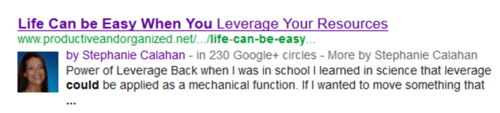
Studies have shown that search results with a picture or video are more likely to be clicked on, thus greater visibility!
Try it and let me know how it works out for you and if you are on Google+ let me know you are there so I can circle you!
You can find me here: Google+ http://www.gplus.to/StephCalahan
To your success!

Thank you Stephanie. I was going to research how to do this and now you have saved me the trouble.
So glad that I could save you time Adrienne! Thanks for stopping by my blog.
It is not going so easy for me. I have linked my google + to my blog and vice versa, and when I go to check it for the last step it shows nothing. 🙁 sigh
I must be missing a step somewhere and I can’t figure it out.
Hi Joanne – I believe that the directions say that it can take up to 48 hours to cycle through what every it needs to do. Give it a little time and let me know how it goes.
Thank you for letting me know that it could take 48 hours. I guess I need to put my patient pants on. LOL
You are most welcome Joanne – I wanted instant gratification when I was setting it up too. 🙂
Thanks for sharing my posts, Stephanie! If your readers want to confirm that they’ve set up Authorship correctly, they should copy the URL of one of their posts and go to http://www.google.com/webmasters/tools/richsnippets – If that tool says it’s valid, it is. They may still need to wait for some time before they start showing up in search results. The more active they are socially (especially on Google+), the faster that will show up.
Hi Mark – Thanks for sharing that tip.